The Roku Channel
- 4.1
- Rating
- 5.00M
- Installs
- Free
- Price
 Analysis by App-foxy
When I want something easy to watch without committing to another paid subscription, I turn to The Roku Channel. I found it most useful as a casual entertainment app: open it, browse for a while, and choose something from a mixture of live television, films, Originals, sports, and children’s programming. It is not trying to replace every streaming service in my collection, but it can fill the awkward gaps when I want background viewing or a quick change from the subscriptions I already pay for.
The app is free, which immediately changes how I judge it. I do not expect the same depth or consistency as a premium service, and I accept that the viewing experience may involve advertising. In return, I get a broad catalog without adding another monthly bill. That trade-off makes it especially appealing for households that want more choice on a shared device, occasional viewers who do not watch enough to justify another subscription, and anyone who enjoys discovering something rather than searching for one specific title.
How The Roku Channel feels to use today
I find The Roku Channel most revealing when it is used by more than one person: a shared screen turns its mix of live and on-demand viewing into a practical way to negotiate what everyone can watch. In this section, I’ll look at how that everyday use shapes expectations, then consider the small choices that help keep a shared setup comfortable for different viewers.
You May Also Like

 Google Keep - Notes and lists
Google Keep’s Quiet Growth Shows the Appeal of Simpler Notes
As mobile work gets busier, Google Keep keeps winning a simple contest: capture a thought quickly, find it later, and get on with the day.

 Blood Strike: 2.5 Anniversary
Blood Strike’s Loadouts Turn Every Drop Into a Tactical Gamble
A close look at Blood Strike’s custom loadouts: how fast access to signature weapons reshapes its battle royale rhythm, rewards preparation, and narrows the gap between fights.

 Pandora - Music & Podcasts
Pandora’s Music Is Easy to Start, but Harder to Recover
Pandora’s strength is its low-effort path from a seed to a station. Its weak spot is how much confidence it asks you to place in connection, setup, and quiet recovery.

 8 Ball Pool
 Is Built on Rivalries, Rematches, and Routine
A close look at the rivalries, rematches, shared routines, and unanswered safety questions that turn a quick pool match into a persistent mobile community.

 Samsung Music
’s Quiet Strength Is Playing What You Already Own
Its reach comes less from spectacle than from dependable access to a personal library. That simplicity is both the app’s strongest retention engine and its ceiling.

 AccuWeather: Weather Radar
AccuWeather Review: A Quick, Clear Forecast for Everyday Decisions
For everyday plans, the best forecast is the one you can understand quickly. AccuWeather makes rain timing, radar, and local conditions easy to act on, with a few trade-offs.
More From Our News Desk



A free entertainment hub rather than a single-purpose streamer
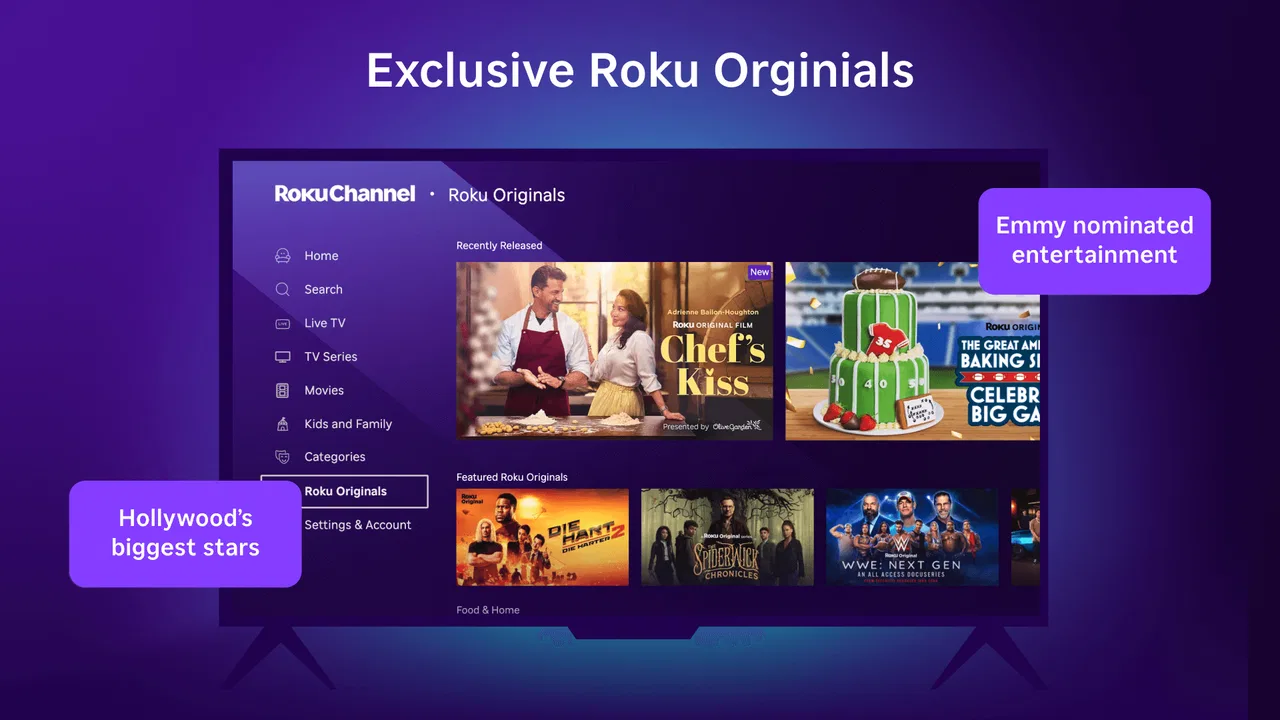
The Roku Channel is an entertainment app from Roku, Inc. and its affiliates. Its identity is wider than a conventional on-demand movie library because it brings different viewing habits into one place. I can move between live channels, films, shows, sports content, Originals, and kids’ entertainment instead of opening separate apps for every type of programming.
That variety is its strongest practical advantage. If I am watching alone, I can browse films. If the television is being used by several people, the live section gives the experience a more traditional, channel-surfing feel. When children need something to watch, the dedicated family-oriented material is more useful than leaving them to search through a completely mixed catalog. The app works best when the question is “What can I watch now?” rather than “Where is this exact show?”
The store summary points to more than 500 live TV channels, along with movies, Originals, sports, and kids’ content. I see that breadth as an invitation to explore, not a promise that every category will suit every viewer equally. A large selection can save time when I am undecided, but it can also make browsing feel less focused than a service built around a smaller, carefully curated library.
The first-session experience and everyday browsing
My preferred way to use the app is to start with a clear purpose. For a short break, I head directly toward live programming. For a longer evening, I browse the on-demand choices and keep a few possibilities in mind before settling on one. This small habit matters because a free streaming catalog can encourage endless scrolling; deciding whether I want live viewing or a specific type of on-demand entertainment makes the app feel quicker.
A realistic example is a weekday evening when I have finished dinner but do not want to start a long series. I can open the app, scan live programming for something already in progress, or choose a film that does not require much preparation. If another person joins me, the broad selection gives us a better chance of finding a compromise than a narrow app dedicated to one genre.
I also think the app is useful as a “second screen” choice, although I would be careful about using that phrase too literally. It can provide something light while I am doing a routine task, but films and sports deserve more attention than background viewing. The free model makes experimentation painless: I can try a channel or title without feeling that I have wasted part of a subscription fee.
What the current release tells me
The current version is 2.0.41, and the app was released on June 27, 2023. Those details place the product in a relatively established phase rather than making it feel like an early experiment. During my use, I approached it as a mature viewing option with a defined purpose: broad, accessible entertainment supported by a free model.
I would not treat a version number by itself as proof that every part of the experience has been transformed. What it does tell me is that the app has moved beyond its initial launch point, so existing users should judge it as an ongoing product rather than a one-time release. The important question is whether the current build fits their viewing routine, not whether a newer number automatically makes it better than every alternative.
The minimum operating-system requirement is Android 7.0. That is helpful for people using older Android hardware, although compatibility alone does not guarantee that an older phone or tablet will feel equally comfortable for streaming. Screen size, speaker quality, battery condition, and the reliability of a home connection still affect the experience far more than the app’s basic ability to install.
How the evolution affects people who already use it
For an existing user, the most meaningful benefit of a current build is continuity. The app remains positioned as a single place for several kinds of free viewing, so someone who already uses it for live channels does not need to rethink its entire role whenever they return. I would still check the interface after an update rather than assuming that familiar browsing habits will remain exactly the same.
Users who mainly watch on a phone may notice the limitations of a small display more than any version change. Live television guides and broad rows of content are easier to understand on a larger screen, while a phone is better suited to short sessions or watching in a private space. I would use a tablet or television-sized display for browsing and films whenever possible, reserving the phone for convenience.
New users should also understand that “free” does not mean “identical to a paid subscription.” The value is the absence of a subscription price, not unlimited control over the catalog or a completely uninterrupted presentation. I find that expectation-setting makes the service much more enjoyable. If I want a particular newly released film, a premium service or a rental platform may be the more direct route.
Live channels, on-demand viewing, and the trade-off between choice and control
The live section changes how I plan my time. With on-demand services, I normally choose a title and begin immediately. Live channels ask me to accept what is currently scheduled, which can be relaxing when I want television to make the decision for me. It is also less convenient when I have a precise preference or only a few minutes available.
That distinction is important for sports viewers. The inclusion of sports content makes the app more interesting for people who like live events, but I would not assume that it can replace a dedicated sports service for every league, match, or viewing habit. A specialist platform is usually better when access to a particular event matters more than general discovery. The Roku Channel is stronger when sports are one part of a wider entertainment mix.
On-demand programming gives me more control, but the free catalog is best approached as a rotating selection rather than a permanent personal library. I would avoid building an elaborate watchlist around the assumption that every title will remain available indefinitely. The practical approach is to watch something when it catches my attention instead of waiting too long because I expect the same choice to be there later.
Children’s viewing and shared household use
The presence of kids’ entertainment makes the app more useful in a family setting, but I would still stay involved in what younger viewers choose. The content rating for the app is Teen, so I would not hand it to a child as though the entire service were automatically designed for very young users. A parent or guardian should guide the selection and consider the difference between a children’s section and the app’s overall catalog.
This is one of the clearest examples of where the app’s broad design requires judgment. A mixed household may appreciate having films, live channels, sports, and kids’ programming together, while a parent seeking a tightly controlled children’s environment may prefer a dedicated kids’ service. The Roku Channel can be convenient for shared viewing, but convenience should not replace supervision.
Where it stands beside familiar alternatives
Compared with paid subscription platforms, this app wins on entry cost and casual discovery. I can use it without adding another recurring payment, which makes it a sensible companion to services I already subscribe to. The compromise is that the catalog and presentation do not offer the same kind of guaranteed premium focus that I expect from a paid platform built around exclusive series or major new releases.
Compared with traditional television, it offers more flexibility because I can open it when I want rather than waiting for a scheduled broadcast. Yet its live channels preserve some of the pleasant unpredictability of ordinary television. That combination is unusual enough to be valuable: I get a channel-surfing option without relying entirely on a conventional television setup.
Compared with free video platforms driven mainly by individual uploads, The Roku Channel feels more like a programmed entertainment service. That can make it easier to settle into a film, channel, or recognizable type of viewing. On the other hand, people who enjoy highly personal creators, niche tutorials, or constant user-generated updates may find a different platform more rewarding.
Three practical habits that improve the experience
First, I separate discovery from commitment. I browse the live area when I want something immediate, then move to on-demand viewing only when I am ready to choose a longer program. This prevents the entire catalog from becoming one overwhelming list and helps me decide whether I want control or spontaneity.
Second, I treat the app as a flexible backup rather than the only source of entertainment. When a paid service has nothing that appeals to me, this one gives me another place to look. That role is more realistic than expecting it to replace every subscription, especially if my viewing depends on specific new releases or a particular sports competition.
Third, I match the content type to the device. Live channels and casual viewing work well when I am away from the main television, but films and group viewing benefit from a larger screen and better audio. If the app feels cramped or tiring on a phone, I would change the device before deciding that the catalog itself is the problem.
Where the free model creates friction
The biggest limitation is the balance between cost and control. A free service has to make its viewing model work without charging me a subscription, and that can make the experience feel less polished than a premium alternative. I am willing to accept that for occasional use, but people who dislike interruptions or want a highly predictable presentation may become frustrated.
Browsing can also be a weakness for viewers who arrive with a very specific goal. The app’s range is attractive when I am open to suggestions, but it does not automatically make a wanted title available. If I already know exactly what I want to watch, I would first check the service most likely to carry it instead of spending time searching everywhere.
The broad mix can create another small problem: not every household member will understand the service in the same way. One person may see it as a live television replacement, another as a free movie library, and someone else as a children’s option. I think it works best when everyone agrees on what role it is filling that day.
Who should use it, and who should skip it
I recommend The Roku Channel to viewers who want free streaming entertainment with more variety than a single narrow catalog. It is a good fit for casual movie nights, households with mixed interests, people testing a new viewing option, and anyone who appreciates live channels alongside on-demand choices. Its one-million-plus installs and a four-point-zero average from roughly 3.3 thousand ratings suggest that it has found a substantial audience, while the free price makes trying it low-risk.
I would be more cautious about recommending it to someone who wants every program to be ad-free, who follows one specific sports schedule, or who expects the latest premium releases in one place. It is also not my first choice for a tightly managed children-only environment because the overall app carries a Teen content rating. In those cases, a paid specialist service or a dedicated family platform may be a better match.
The app has received 195 reviews, and I would read that figure as a reminder to judge it by personal viewing habits rather than popularity alone. A service can be widely used and still be wrong for someone who needs a particular catalog, interface, or level of control. My own recommendation is strongest for people who value breadth and price more than exclusivity.
What I would watch as the product continues
For future use, I would pay attention to how the balance between live programming and on-demand viewing develops. The combination is the app’s defining advantage, so improvements that make it easier to move between those modes would matter more to me than cosmetic changes. I would also watch whether the experience continues to feel approachable on both older Android devices and newer, larger screens.
I would keep an eye on catalog freshness as well. A free service remains compelling when it gives me a reason to return, whether that comes from new films, changing live options, Originals, sports, or family programming. I would not assume what future additions will be, but continued variety is clearly central to the app’s usefulness.
My final view is positive but measured. The Roku Channel is not a universal replacement for paid streaming, traditional television, or specialist sports and kids’ platforms. It is better understood as a free, broad entertainment layer that can rescue a dull evening, add live viewing to a subscription-heavy setup, and give a family more options without another bill. I would install it if I wanted flexible discovery and could accept the compromises of a free service; I would skip it only if precise, premium, uninterrupted access mattered more than variety.
FAQs for The Roku Channel
01What is The Roku Channel and how does it work?
The Roku Channel is a free streaming app available on Android and iOS devices that offers a wide range of entertainment. It includes movies, TV shows, live news, and more. Users can access content without any subscription, though there are options for premium channel subscriptions if desired. It’s user-friendly and updates regularly with new content.
02Is The Roku Channel truly free to use?
Yes, The Roku Channel is free to download and use. It provides a variety of free content supported by ads. While most content is free, users can also choose to subscribe to premium channels, which require payment. The app offers transparency on which content is free and what requires a subscription, allowing users to decide accordingly.
03Can I watch live TV on The Roku Channel app?
Yes, The Roku Channel offers live TV streaming options. Users can access various live news channels and other live events. The selection of live channels may vary and is ad-supported, providing users with real-time access to news and entertainment without needing a cable subscription.
04How do I download The Roku Channel on my device?
To download The Roku Channel, simply visit the Google Play Store or Apple App Store, depending on your device. Search for 'The Roku Channel' and click 'Install' to download the app. Once installed, open the app and sign in or create a free account to start streaming content immediately.
05What kind of content can I expect on The Roku Channel?
The Roku Channel offers a diverse range of content including movies, TV shows, documentaries, live news, and kids’ programming. It features both classic titles and new releases, catering to a wide array of preferences. Additionally, there are options for subscribing to premium channels for more specialized content.
Pros
- Extensive free content library.
- User-friendly interface.
- Compatible with various devices.
- Regularly updated content.
- Minimal ad interruptions.
Cons
- Limited offline viewing options.
- Some content is region-locked.
- No live TV streaming.
- Frequent app updates needed.
- Search functionality can improve.

The Roku Channel
Gallery